












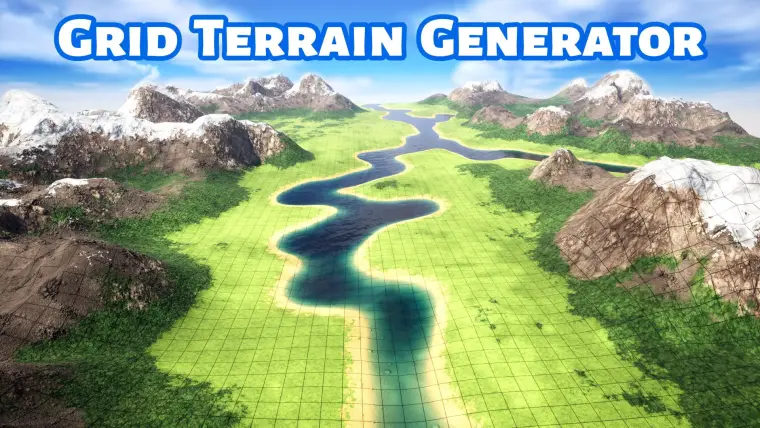
Grid Terrain Generator
The Grid Terrain Generator is a Blueprint asset that allows you to create terrains directly in Unreal, without having to use any external software or plugins.
Everything is done with the standard Blueprint nodes, which makes it extremely easy to integrate into any project. Simply drag the asset to your level, and play with the settings in the details panel to create your terrain.
With its custom functions and systems, it allows you to create a great variety of landscapes, beautiful organic coastlines, rivers, islands, mountains ranges, plateaus, canyons, and more.
The generator produces a square grid, with an initial resolution of 8x8 cells, that is later subdivided to add the geographic features of the terrain, up to a resolution of 128x128 cells. This unique approach provides flexibility, and allows you to quickly explore different layouts in low resolutions, before moving forward to adding details in higher resolutions. And even then, you can go back at any moment, moving back and forth between resolutions to fine tune your terrain.
Workflow
The workflow consists of simply dragging the blueprint asset into the viewport and design the terrain using the parameters in the details panel.
The Generator has a parametric design, and relies on random “seeds” to create many of its features. While there are plenty of controls and tools to define the look of a terrain, the design process has a more exploratory approach. Meaning, for example, you can decide where a river will start, but the course of the river will be defined randomly. You can then try different “seeds” for the river shape (each seed creating a river with a new random course), and explore the alternatives until you find a river that you like.
This approach is great for generating multiple alternatives. Simply by changing any seed value you can create a new variation of the terrain.
Features and product highlights:
- 100% made with standard blueprint nodes. No external tools needed. (it does not use PGC, C++, or plugins).
- The innovative and unique Quadrant System allows you to quickly define the general layout of the terrain.
- Generate endless variations of a terrain just by changing any of the random seeds.
- Generate terrains with a resolution up to 128x128 tiles*.
- fully parametric system.
- The terrain has collisions, and it is walkable.
- Auto Landscape Material with 8 layers. With common functionality like slope masking, height masking, edge noise, and distance blend textures.
- The default terrain has side length of 400 meters, but you can increase this size as much as you want, even to multiple kilometers.
- Includes basic functionality for adding props.**
- You can create a Cross Section mesh on the edges of the terrain for better presentation.
- The water plane is part of the procedural mesh, and can be turned off if needed.
- The grid texture adjusts itself automatically to the subdivision of the terrain, but can also be adjusted manually to have a different tilling.
- You can convert the terrain to Static Mesh if needed.
Notes and limitations:
- *The blueprint is by default configured for a maximum resolution of 128x128. But it is technically possible to increase this resolution, at the expense of greater processing times. Check documentation for a detailed explanation.
- All the functionality was programmed in the Construction Script of the blueprint. There is no functionality to modify the terrain during gameplay. All interactivity and events will have to be created according to your needs.
- It is strongly recommended to modify the parameters by entering the values with the keyboard, and avoid using the parameters as sliders. This, to prevent Unreal from recalculating the terrain multiple times while you move the slider.
- The terrain is modified by changing the parameters in the details panel. It cannot be sculpted.
- **The functionality for adding props only allows one type of prop/mesh by default. For adding multiple types of props, you must extend or modify this functionality according to your needs.
- The Foliage tool doesn’t work on procedural meshes, like this terrain. However, you can convert the terrain into a Static Mesh and then use the Foliage tool on the Static Mesh.
Overview of functionalities:
- Creation of basic layout:
- Quadrants Matrix
- Coastline Shaper
- Subdivision:
- Terrain Subdivision
- Layout variation:
- Noises per subdivision level
- Coast Breaking
- Creation of Geographic Elements:
- Rivers
- Mountains
- Mountain Chains
- Additional Functions
- Water Plane
- Flatten
- Z Scale
- Final Subdivision and Smooth
- Final Noise Pass
- Cross Section
- Adding props
Technical Details
Blueprints:
Main Terrain Generator blueprint.
Vertex Count
8x8 Base Grid: 81 vertices.
128x128 Subdivided grid: 16384 vertices
Materials
1 Auto-Landscape Material
24 Material Instances
1 Cross Section Material
1 Water Material
Landscape Material features:
8 material layers:
5 main layers for different elevations
1 for bedrock or background
1 for cliffs with World-Aligned Textures
1 for masking with a custom texture
Each layer uses 3 textures: BaseColor, Roughness and Normal
Height masking, Slope masking and Edge Noise
Distance Blend textures (except for Cliff layer.)
Micro and Macro Tiling variation
Controls for opacity and color of the grid texture
Textures (2048x2048)
8 Sets of tileable textures - BaseColor, Normal, Rough, AO
2 Grid textures (Square and triangles)
Collisions
Yes, automatically generated.
Demo Levels
Terrain Examples
Geographic Elements
Workflow Example
Giant Terrain Example
Prop Placing Demo
Meshes
3 Lowpoly prop meshes (House and trees).
10 area reference meshes.
LODs: NO
Lightmaps: NO
Supported Platforms: Windows, Mac.