





Spline Path System – Movement Framework
Spline Path System – Movement Framework is a Blueprint-only spline-locked movement solution for “rail / guided path” gameplay with optional junction switching and room transitions.
Key Features
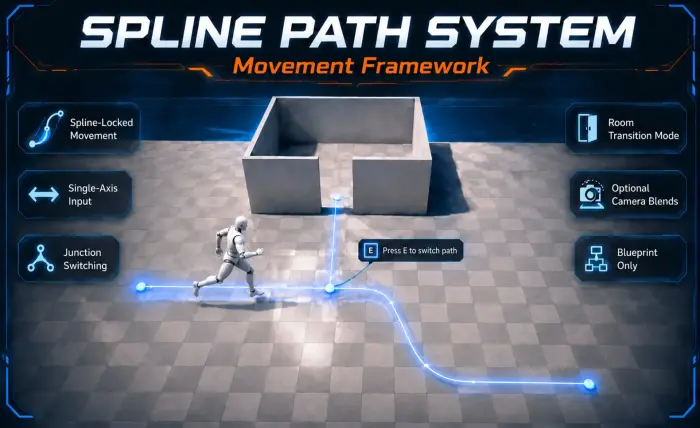
Spline-Locked Movement (No Drift): player movement is strictly constrained to the active spline.
Single-Axis Input: movement uses only one axis (forward/back) while on spline.
Junction Switching: show an interaction prompt and press E to switch to an alternate spline at junctions.
Room Transition Mode: exit spline mode and restore full WASD movement inside “Room” areas.
Optional Camera Blends: smoothly blend to a new camera when entering a room (if configured).
Blueprint-Only: no C++, easy to integrate.
How It Works
Enter spline mode via BP_SplineSwitchTrigger.
While on spline, movement is locked to the path (no sideways movement).
At junction triggers, a prompt appears: “Press E to switch path”.
At end triggers, you can either exit spline mode or transition into a room (full WASD).
Controls / Input
SPLINE MOVEMENT (LOCKED)
Movement is strictly constrained to the spline (no sideways drift).
Axis mapping depends on SwitchSpline:
SwitchSpline = False — driven by X
SwitchSpline = True — driven by Y
Enter the path via BP_SplineSwitchTrigger.
ROOM MODE (UNLOCKED WASD)
EndPath can be configured as a room transition (CanGoToRoom = True).
Exits spline mode and restores full WASD movement.
Optional: if NewCamera is set, the view blends to that camera on enter.
Return to spline via BP_SplineSwitchTrigger.
Included
Blueprint actors: Spline switch triggers / junction triggers / end triggers
Example level setup (recommended)
Basic UI prompt widget (switch path)
Notes
Designed for quick integration: place splines + triggers, assign references, play.
Technical Details
Features:
Spline-locked player movement (no sideways drift)
Junction switching between splines with Press E prompt
Optional “Room” transition that restores full WASD movement
Optional camera blending on room enter (NewCamera / SetViewTargetWithBlend)
Blueprint-only, plug-and-play example setup
Number of Blueprints:
Core Blueprints: ~5 (Actors + Actor Component + Widget)
Input (preconfigured):
Keyboard: WASD movement
Interaction: E (switch path at junctions)
Axis usage while on spline:
SwitchSpline = False → driven by X
SwitchSpline = True → driven by Y
Network Replicated:
No
Supported Development Platforms:
Windows: Yes
Documentation: https://docs.google.com/document/d/1ccCAWifHdvtzW01coThYot6Eej8UGT-a4L08uYyuIM4/edit?usp=sharing
Important/Additional Notes:
Requires the player pawn/character to have the spline movement Actor Component (SplinePawnComponent / AC_Spline).
Place spline actors and triggers, assign spline references, then play.