



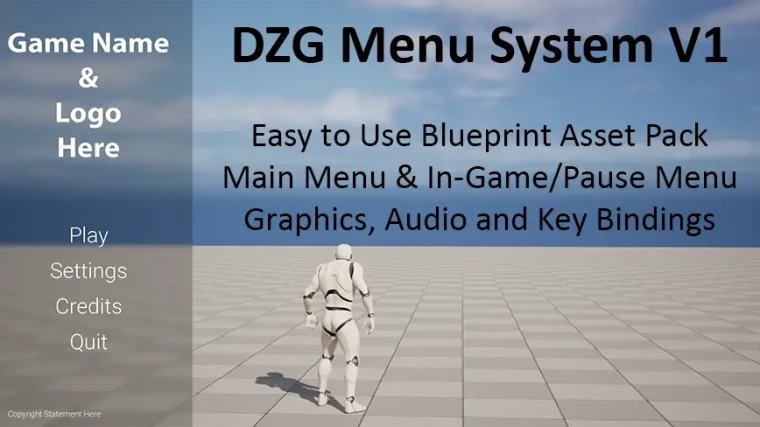
DZG Menu System V1
Easy to add menu system featuring a main menu, in-game/pause menu and settings menu with graphics, audio and key binding settings.
DZG Menu System V1 is an easy to use Blueprint asset pack for adding a main menu and an in-game/pause menu system to your game. A basic settings menu features many parameters you will need for your UE4/UE5 game project - graphics, audio and key bindings. A fully functional multi-purpose Blueprint widget enables you to view and customize all settings and programming in a single Blueprint. The DZG Menu System V1 is completely documented, fully functional and only takes 3 simple steps to add into your game.
Product Updates:
09/11/2023
- Highlighting of menu navigation buttons is now supported for gamepad and keyboard input.
08/17/2023
- BP_MainMenuUI, BP_InGamePauseMenuComponent: Changed [Add Mapping Context] node priority from 1 to 0 in order to not override any default Input Actions
- WBP_MainMenu, WBP_InGamePauseMenu: Added [Set Show Mouse Cursor] node with Show Mouse Cursor set to false to ensure mouse is hidden when Input Mode is set to Game Only
06/02/2023
- Verified menu system on UE 5.2
- Changed directional Input Actions from Boolean to Axis 1D (Float)
- Updated BP_InGamePauseMenuComponent to temporarily display key function when key is pressed.
04/15/2023
- Gamepad Input Key Bindings now enabled
- Display Resolution Selection Buttons are now enabled based on the player's desktop resolution (Corrects the issue where the display resolution was being set to a setting that the player's desktop resolution didn't support)
- Pause key changed from the [TAB] key to the [P] key
- Pause key can now be used to pause and unpause game
- Added a customizable Credits widget to the Main Menu
- Discontinued support for UE 4.23
- Additional bug fixes and performance improvements
01/25/2023
- Rebuilt to support UE 4.23-4.27, 5.0-5.1
- Utilizes UE 5.1 Enhanced Input Action Mappings
12/23/2022:
- Graphic Settings: Added Vertical Sync (V-SYNC) Enablement
- Key Binding Settings: Additional Key Bindings were added
Technical Details
Features: (Please include a full, comprehensive list of the features of the product)
- Ready to use Blueprint menu system - fully functional
- Main menu & in-game/pause menus with settings options
- Mouse/Keyboard and Gamepad navigation
- Blueprints and widgets enable you to change Graphics, Audio and Key Binding settings
- Settings can be applied and saved on disk and re-loaded on game start
- Sample audio cues included demonstrating use and control over music, effects, and voice sounds
- In-game/pause menu with customizable section for game instructions
- Customizable Credits widget
- Completely commented and clean Blueprints
- Color coded Developer comments highlighting Blueprint nodes that need to be integrated into game levels and characters
- Fully functioning example demo levels and character
Technical Details:
- Number of Blueprints: 9
- Number of Levels: 3
- Number of Level Sequences: 1
- Number of Structures: 2
- Number of Textures: 1
- Number of Sound Mixers: 4
- Number of Sound Classes: 4
- Number of Sound Waves: 4
- Number of Sound Cues: 3
- Number of Enhanced Input Mapping Contexts (UE 5.1): 1
- Number of Enhanced Input Mapping Actions (UE 5.1): 13
Input: Mouse, Keyboard, Gamepad
Network Replicated: No
Supported Development Platforms:
Windows: Yes
Mac: No

![Small Structures VOL.2 [ Low Poly ]](https://assetsue.com/uploads/img/low/img/2024-09/SmallStructuresVOL2LowPoly.webp)