





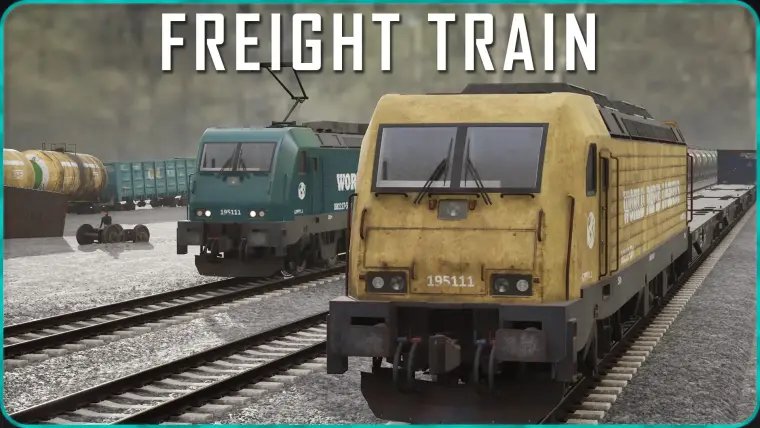
Freight Train
Freight Train Pack includes assets for your industrial/railway scene.
Meshes can be used to decorate world.
BP_Train blueprint can be used to assemble a train.
Materials are customizable to have a look ranging from new to very old/rusty/dirty.
Meshes:
Wagons: with/without wheels
Locomotive (+separated doors and roof equipment)
Open Wagon (+Coal)
Flat Wagon (+Shipping Container)
Box Wagon (+separated doors)
Tank Wagon
Diesel or Electric roof equipment
Locomotive: front and tail lights, headlight beam
Cabin interior with screens, Driver
2 Bogies
Straight Concrete Track mesh
Train Blueprint:
BP_Train is customizable blueprint, which assembles train.
Train can only be assembled in a straight line
Random Wagon colors picked from array
Adjustable: rust, dirt, old pain
Adjustable locomotive roof equipment
Locomotive lights including interior and headlight beam
Driver inside
Static or Movable mobility for a whole Train
There are 3 ways to add train wagons:
1. 🎛️ Add Wagons from Preset.
Set Number of Wagons. This defines the total number of wagons in the Train.
Select 🎛️ Wagons Preset. The train wagons will be instantly replaced by a new wagon list.
A preset defines which wagon types and in what proportions will be used in this train.
Preset doesn't select each wagon randomly from list. Instead, wagons are added block by block. You can set Average Block Size.
Each block contains several wagons using same mesh and similar color, like in real freight trains.
✍️ Add Wagons Manually.
Define Add Wagons Type. Optionally, define Add Wagons Color (or leave default black — in this case, a random color will be applied).
Set Add Wagons Count. The specified number of wagons will be instantly added to the end of the Train.
Manually edit List of Wagons.
Add needed wagons one by one. For each wagon, you can change Type, Color and enable Cargo (Cargo applies to Open and Container wagon types only).
You can edit this List of Wagons at any time, even after you have used Preset or Manual addition of Wagons.
No movement blueprint, track blueprint, or sounds included. Train only. See full pack if you need movement and railway.
Technical Details
Number of Unique Meshes: 26
Vertex Count: 1600 to 428000 (merged Locomotive)
Collision: Yes, custom
LODs: No
Number of Materials: 14
Number of Material Instances: 23
Number of Textures: 51
Texture Resolutions: 128 to 4096
Wagons make use of complex yet efficient materials. Each wagon uses 2 or 4 4K textures as masks.
If needed, to reduce project size and memory usage, reduce size of 4K textures (set Max Texture Size to 2048 or 1024)
Each mesh feature:
High quality geometry and UVs
Polycount is enough for HQ renders but made with performance in mind. No unnecessary polygons.
Nanite enabled (except Locomotive windows)
Correct lightmap UVs
Ready for Baked lighting, Lumen, Mobile, Path Tracing
Game-ready collision
Real world scale